Source Manager for Unreal Engine
A downloadable USM for Windows
Source Manager for Unreal Engine
The free tool that takes you from empty PC to source-built editor — no build engineer required.
Building Unreal Engine from source shouldn't feel like a boss fight.
You know the drill: three wiki tabs open, a forum thread from 2021, guessing which Visual Studio components you actually need, an hour-long build that fails at 97%, and then — just when the editor finally starts — "Unable to launch ShaderCompileWorker."
Source Manager turns that entire gauntlet into buttons. Click them in order. Ship games instead.
🕐 Your first hour, not your first week
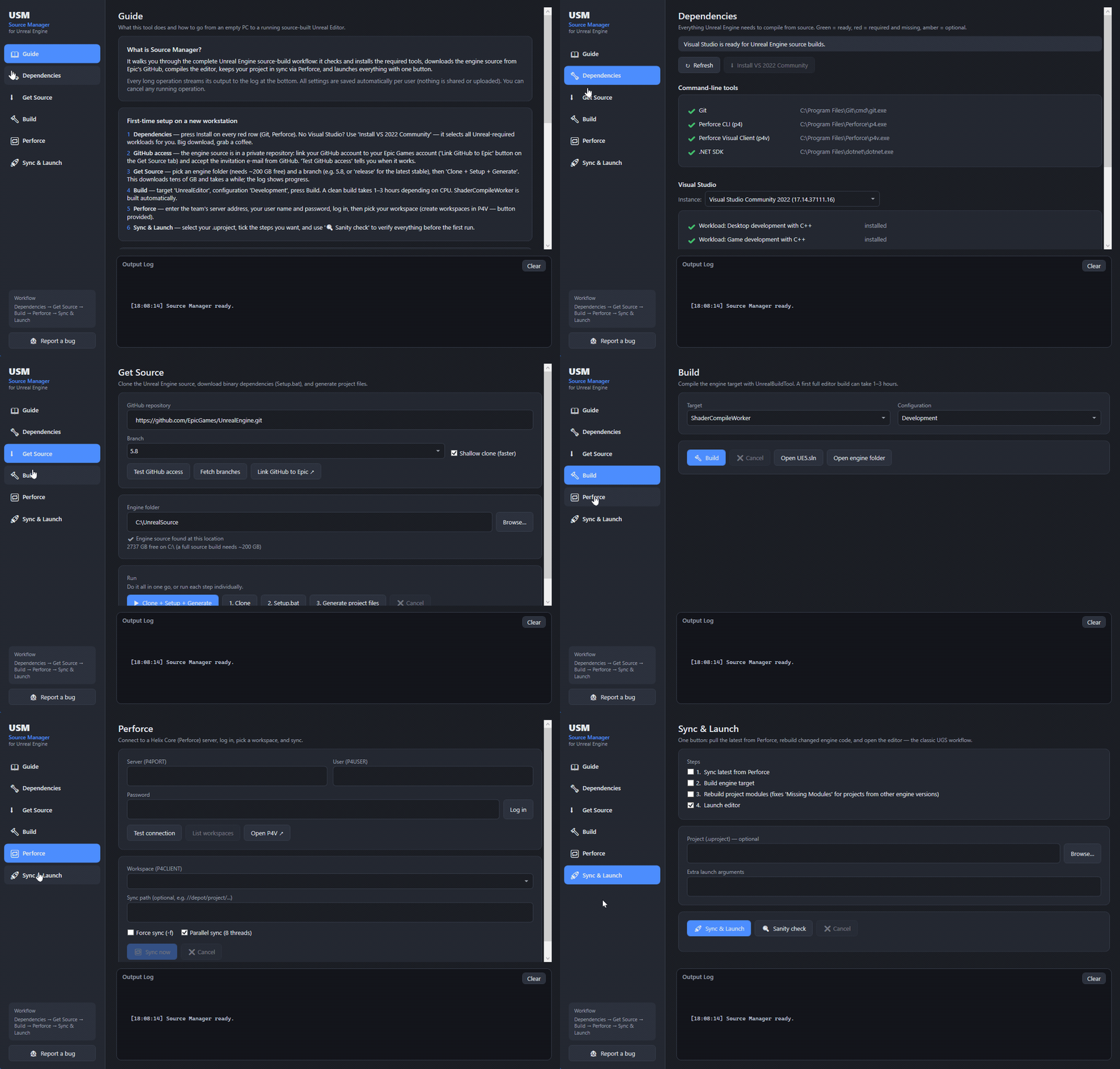
The app opens on a built-in step-by-step guide. On a completely fresh Windows machine, a new team member can:
1️⃣ Install everything — Git, Perforce, and Visual Studio 2022 with the exact workloads Unreal requires, each one click. The app detects what's missing and fixes it. No more "which components do I need?" roulette.
2️⃣ Get the engine — verify GitHub↔Epic access, pick a branch (5.x, release, ue5-main), then one button runs the whole chain: clone → Setup.bat → GenerateProjectFiles.bat, with live logs and a disk-space reality check before you commit your evening to it.
3️⃣ Build the editor — any target, any configuration, real progress bar. ShaderCompileWorker builds automatically, so the classic startup error simply never happens.
4️⃣ Connect Perforce — server, login, workspace. Your password is never stored anywhere; only Perforce's own session ticket.
5️⃣ Sync & Launch — the daily-driver button: pull latest → rebuild engine → rebuild your project's modules → open the editor. Every step toggleable. Most mornings you'll use exactly one click.
🔍 And when something is broken…
Hit Sanity Check. It tests the entire chain — tools, engine source, dependencies, VS components, Perforce ticket, workspace, built binaries — and tells you exactly which tab fixes each problem. It even knows things like "your login ticket expired" and "this project was built with a different engine version."
Moving a launcher-created project to your source build? The infamous "Missing Modules" dialog has a dedicated fix built in: one checkbox rebuilds your project's modules against the new engine on the way to launch.
📦 What you get — completely free
- ✅ One-click Windows installer (per-user, no admin rights needed)
- ✅ Fully self-contained — no .NET, no runtimes, no dependencies to install first
- ✅ Nothing phones home; settings live in your own user profile
- ✅ Free forever. No license keys, no upsells, no "pro version". A community tool, plain and simple.
✅ Requirements
- Windows 10/11 (64-bit)
- An Epic Games account linked to GitHub — free, required by Epic for engine source access (the app walks you through it)
- ~200 GB free disk space for a full engine build
- A Perforce server for the sync features (everything else works without one)
❓ FAQ
Does this include Unreal Engine source code? No — the source comes straight from Epic's official GitHub repository using your Epic-linked account, under Epic's own license. This tool automates everything around it.
Which engine versions? Any UE5 branch on Epic's GitHub: release, 5.x, ue5-main.
My teammates aren't build-pipeline people. Will they manage? That's exactly who this is for. Install → follow the built-in guide → click the buttons in order.
Windows shows "Windows protected your PC"? It's an unsigned community tool — click "More info → Run anyway". The code does nothing your own terminal wouldn't: it drives Epic's official scripts, git, and p4.
💙 Free community tool. If it saves your team a day of setup pain, tell another dev about it.
Not affiliated with, endorsed by, or sponsored by Epic Games, Inc. Unreal and Unreal Engine are trademarks or registered trademarks of Epic Games, Inc. in the US and elsewhere. Perforce is a trademark of Perforce Software, Inc.
Download
Install instructions
Run the Installer it will guide you